Skip to content

For Technicians, Balancers & Engineers

Release Candidate

Measure. Balance. Document.

Goodale HVAC Fieldbook connects serious HVAC engineering calculations to controlled commissioning projects, phased measurements, design tolerances, deficiencies, instruments, approvals, and customer-ready reporting.

Built for mechanical rooms, rooftops, job trailers, balancing routes, and engineering review. Core workflows work offline, no account is required, and project records stay on your device.

App Store review in progress
Release status and support
Goodale HVAC Fieldbook industrial blue gauge app icon

A complete field record—not another calculator list

  • TAB and balancing depth

    Run duct traverses, pitot airflow, outlet percent balance, total external static, ACH, K-factor flow, outside-air percentage, and mixed-air checks.

  • Hydronic engineering

    Solve tons, GPM, BTU/hr, and delta T, then check water static pressure, pump head, pipe velocity, pipe volume, valve Cv flow, and pump power.

  • Psychrometrics and diagnostics

    Solve air states, cooling-coil performance, fan and VFD predictions, electrical load, refrigeration temperature differences, efficiency, gas input, and engineering conversions.

  • Controlled commissioning projects

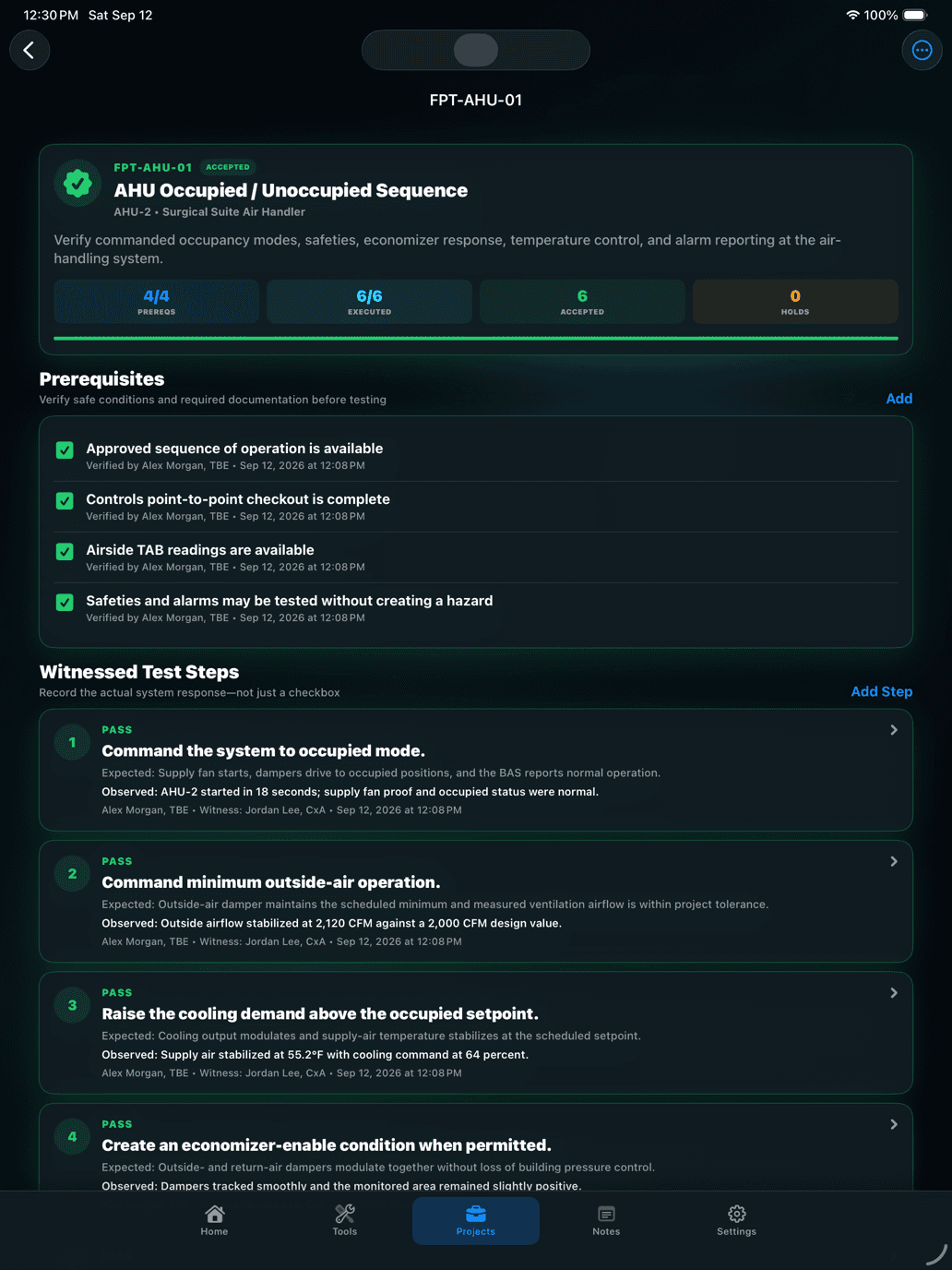
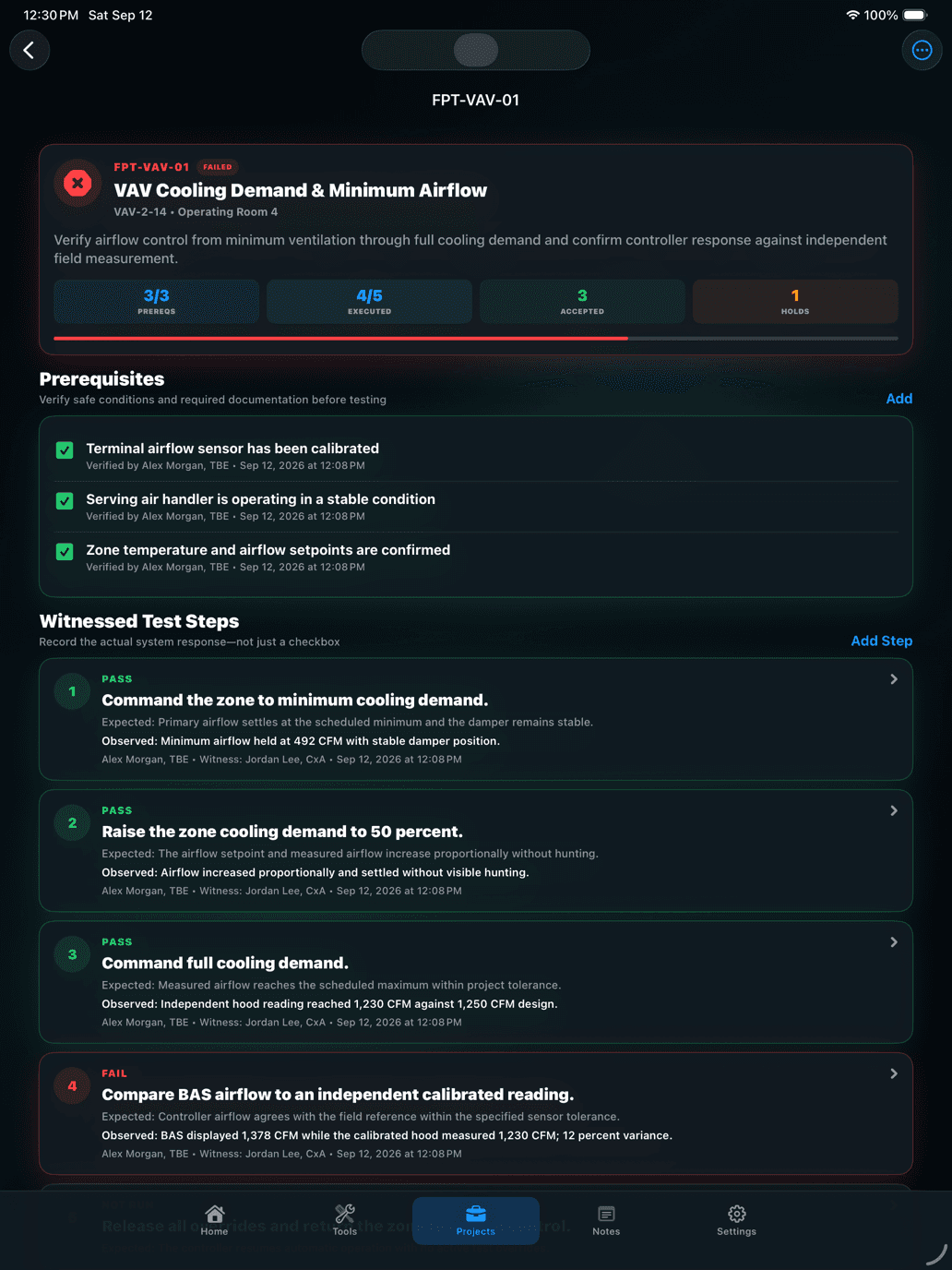
    Organize projects by customer, site, area, system, equipment, and test point. Capture initial, adjusted, and final readings with clear units, tolerances, timestamps, and technician context.

  • Deficiencies and closeout

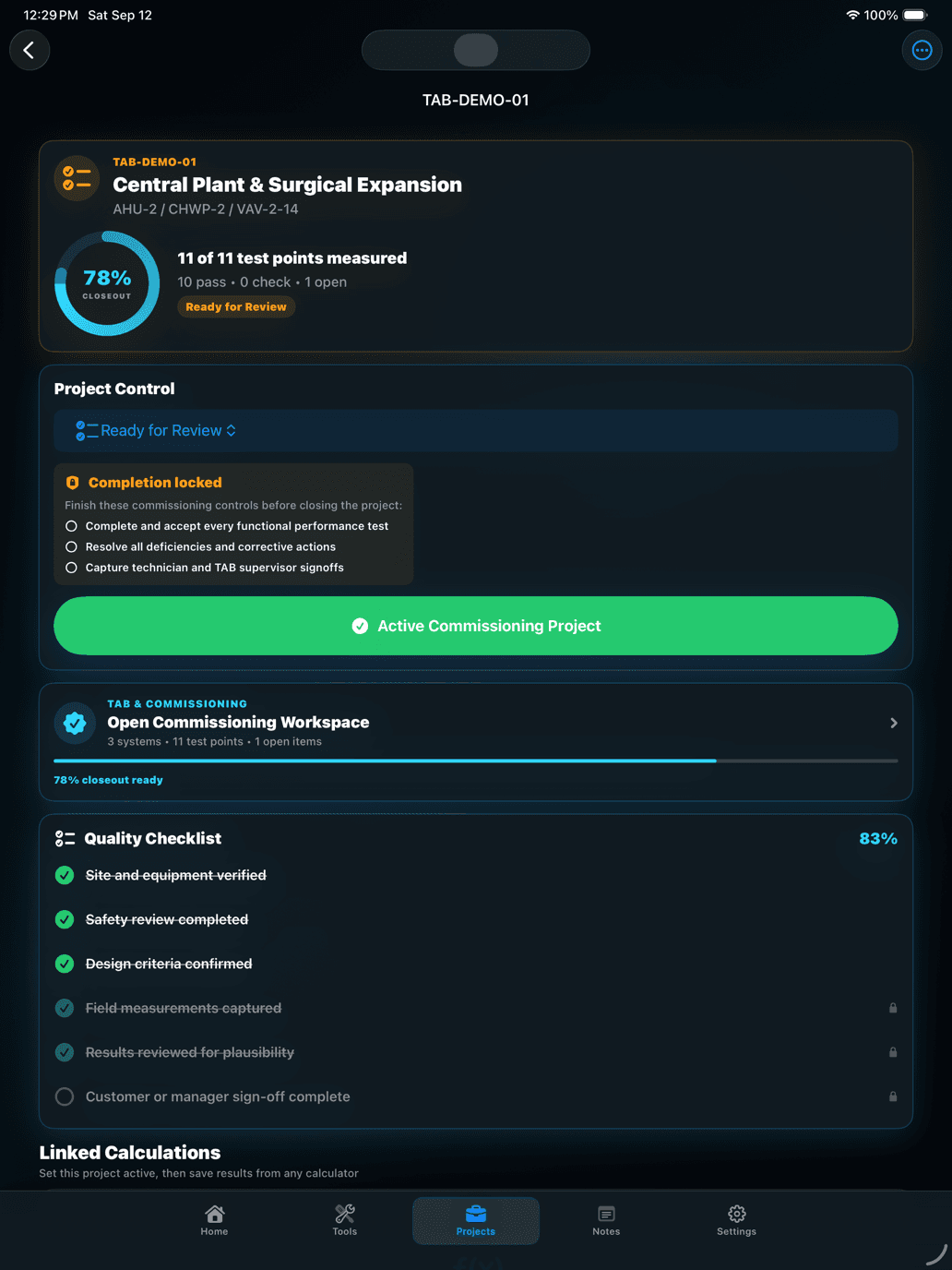
    Track corrective actions, verification notes, instrument calibration, evidence-driven readiness, preparer and reviewer details, customer approval, and a local signature.

  • Professional proof

    Export a print-ready PDF closeout package or analysis-ready CSV with systems, test points, design-versus-actual results, deficiencies, instruments, notes, approvals, and linked calculations.

App Screenshots

See Goodale HVAC Fieldbook in action

Goodale HVAC Fieldbook industrial blue gauge app icon

Goodale HVAC Fieldbook

Measure. Balance. Document.

  • TAB and air-balancing workflows
  • Hydronic, airside, refrigeration, and electrical math
  • Role-focused tools for technicians, balancers, and engineers
  • Systems, equipment, test points, readings, and tolerances

Designed for real HVAC work

  • Role filters surface the right tools for a balancer, engineer, or technician.
  • Search, favorites, and recent results keep common calculations close.
  • The commissioning-readiness KPI is calculated from measurements, deficiencies, calibration, and required sign-offs.
  • Dark and light appearances support mechanical rooms, rooftops, and office review.
  • No advertising, third-party tracking, or Goodale Studios job-data server.

Professional by design

Packed with capability, clear enough for the field

The interface is organized around Home, Tools, Projects, Notes, and Settings, with adaptive controls, clear units, direct results, and persistent project context. It stays fast in the field without reducing professional commissioning work to a generic calculator list.

Engineering library

29 field calculators

Commissioning workflow

Setup through signed closeout

Core workflow

Offline and local-first

Goodale HVAC Fieldbook release status

Goodale HVAC Fieldbook is undergoing final quality verification before a new App Store review request. No public download is available yet.

App Store review in progress
Visit support

Guides & tutorials

Learn Goodale HVAC Fieldbook from the first step to the best practices.

Explore the complete product tour, a guided first journey, practical advice, and the story behind why this app was built.

Open the Goodale HVAC Fieldbook Learning Center

Official Product Facts

What is Goodale HVAC Fieldbook?

A professional offline commissioning fieldbook for HVAC technicians, TAB specialists, and engineers—with 29 calculators, controlled project workflows, KPI visibility, and signed closeout reports. Goodale HVAC Fieldbook 1.0 build 4 is waiting for Apple App Review. It is not publicly downloadable until Apple approves the release.

Status
Release Candidate
Category
Utilities
Publisher
Goodale Studios

How It Works

A focused path through Goodale HVAC Fieldbook.

  1. 1

    Role filters surface the right tools for a balancer, engineer, or technician.

  2. 2

    Search, favorites, and recent results keep common calculations close.

  3. 3

    The commissioning-readiness KPI is calculated from measurements, deficiencies, calibration, and required sign-offs.

  4. 4

    Dark and light appearances support mechanical rooms, rooftops, and office review.

  5. 5

    No advertising, third-party tracking, or Goodale Studios job-data server.

Frequently Asked Questions

Answers about Goodale HVAC Fieldbook.

What should I include in a support request?

Include your device model, iOS or iPadOS version, Goodale HVAC Fieldbook version and build, the calculator or project screen you were using, selected units, the steps immediately before the issue, and the exact error message. Redact customer names, site addresses, company-confidential details, signatures, and report content whenever possible.

Do I need an account or internet connection?

No. The current release has no Goodale HVAC Fieldbook account or login, and core calculators, projects, measurements, deficiencies, instruments, notes, history, backups, and report generation work offline. Internet access is needed only when you choose to open an external web page or send content through another service.

Where are my company and project records stored?

They are stored locally on your device. Goodale HVAC Fieldbook does not provide cloud sync or a Goodale Studios backup server. Apple device backups may include app data depending on your settings, and you can create an app-generated project backup from Settings.

How do I attach a calculation to a project?

Create or open a project, make it active, run the calculator, then choose Save to Project. Select the relevant system, equipment, test point, instrument, and notes where applicable. The complete inputs, formula, result, units, and timestamp remain linked to the project.

How do I export a professional report?

Open Projects, choose a project, review its systems, readings, deficiencies, instruments, sign-off, notes, and linked calculations, then use the report export. Select PDF for a print-ready closeout package or CSV for analysis and record transfer.

Can I recover deleted records or a deleted app?

Goodale HVAC Fieldbook has no developer-operated recovery service. Review deletion confirmations carefully and export important reports before removing records or deleting the app. Recovery may be possible only through an Apple device backup that contains the app data.

Need something else? Visit Goodale HVAC Fieldbook Support.

More From Goodale Studios